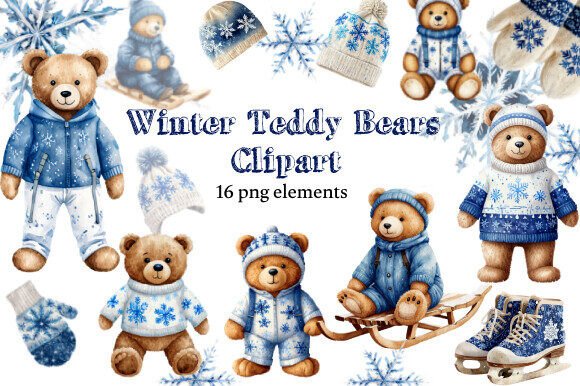
Winter Teddy Bears, Snowflakes, Skates: A Practical Guide to High-Quality Watercolor Clip Art
When the holiday season approaches, the demand for warm, nostalgic imagery spikes. For designers, bloggers, and crafters, finding assets that capture the cozy essence of winter without looking generic is a constant challenge. This is where a collection like Winter Teddy Bears, Snowflakes, Skates becomes invaluable. These high-resolution watercolor illustrations offer a hand-drawn aesthetic that digital vectors often fail to replicate. However, simply downloading a set of images does not guarantee a professional result. Many creators overlook critical technical details regarding resolution, color profiles, and licensing, leading to projects that look pixelated, washed out, or legally questionable.
Understanding the Value of Hand-Drawn Watercolor Elements
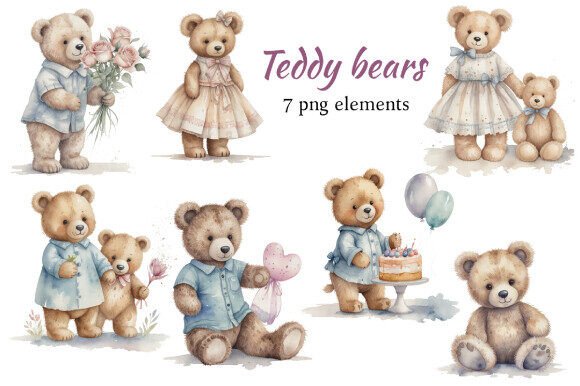
The appeal of this specific clip art set lies in its texture and emotional resonance. Unlike flat vector graphics, watercolor elements possess organic edges, subtle color gradients, and a sense of imperfection that feels human. When you incorporate a teddy bear wrapped in a scarf or delicate snowflakes into an invitation or blog header, you are leveraging these textures to evoke feelings of comfort and tradition.
For small business owners creating Christmas toys packaging or educators designing winter-themed worksheets, these visuals serve as more than just decoration; they establish brand personality. The inclusion of items like mittens, hats, and ice skates alongside the bears provides a cohesive narrative. Yet, the value of these assets is entirely dependent on how they are handled during the design process. A beautiful image can be ruined by poor application, turning a potential masterpiece into a low-quality afterthought.
Common Mistakes That Ruin High-Resolution Graphics
One of the most frequent errors I see beginners make is assuming that "high resolution" means the image will automatically look good in any context. While this set offers files at approximately 3000 x 3000 pixels (roughly 10x10 inches at 300 dpi), simply dragging and dropping them into a layout without checking the canvas settings can lead to disappointment. If your document is set to a massive print size, such as a large poster, even 3000 pixels might stretch too thin if not scaled correctly. Conversely, using a 3000-pixel image for a tiny social media icon wastes processing power and file space.
Another significant misunderstanding involves the difference between RGB and CMYK color modes. The Winter Teddy Bears, Snowflakes, Skates set is provided in RGB PNG format. This is perfect for web design, blogs, digital invitations, and screen-based presentations. However, many users attempt to print these directly to commercial presses without converting them to CMYK. The result is often a drastic shift in color vibrancy; the soft pinks and blues of the watercolor may appear muddy or dull on paper. It is crucial to understand that what you see on your monitor is light-based (RGB), while print uses ink (CMYK).
Licensing is another area where confusion often leads to costly mistakes. Some creators assume that buying a digital download grants them unlimited rights to resell the raw files or use them in trademarked merchandise. Typically, these licenses allow for personal use and limited commercial applications, such as printing on physical goods you sell yourself, but strictly prohibit reselling the digital files as-is. Ignoring these terms can lead to legal issues and account suspensions on creative marketplaces.
How to Avoid Pitfalls and Maximize Quality
To ensure your projects shine, start by verifying your intended output medium before you even open the design software. If you are creating a physical product like a greeting card or a tableware design, check the DPI requirements of your printer. Since this set comes at 300 dpi, it is ideal for standard print sizes up to 10x10 inches. If you need a larger banner, do not stretch the image; instead, arrange multiple elements to create a pattern or collage, which maintains the crispness of the individual lines.
For those working in print, always convert your final design file to CMYK before sending it to the printer, rather than trying to force the RGB PNGs to work in a CMYK environment. Use design software that allows you to preview color shifts. This step ensures that the delicate watercolor washes retain their intended softness and that the white spaces of the snowflakes remain bright against colored backgrounds.
Regarding usage, treat these digital downloads as components of a larger design, not the final product. Do not simply place a teddy bear on a white background and call it a logo. Instead, layer the elements. Place a snowflake overlay with reduced opacity behind text, or use the ice skates as a border element for a quote graphic. This approach adds depth and professionalism. Remember, the goal is to integrate the art seamlessly into your project, whether it is a scrapbook page, a decoupage item, or a website header.
Evaluating Your Needs Before You Buy
Before purchasing a set like Winter Teddy Bears, Snowflakes, Skates, take a moment to audit your current project requirements. Ask yourself if you truly need 16 individual files, or if a smaller subset would suffice. Sometimes, buying a larger bundle is cost-effective, but only if you have immediate plans for all the elements. Hoarding unused assets can clutter your workflow and waste resources.
Consider the versatility of the items included. Does the set contain the specific shapes and colors you need? In this case, the combination of bears, snowflakes, mittens, hats, and skates offers a broad palette for various themes, from New Year's crafts to Christmas decor. However, if your project requires a very specific color scheme—such as monochromatic silver and gold—you must evaluate if the watercolor hues can be adjusted easily in your editing software without losing the hand-drawn texture. Most PNGs with transparent backgrounds allow for basic adjustments, but complex color grading can sometimes flatten the artistic style.
Practical Applications for Every Creator
The true strength of this clip art set lies in its adaptability across different platforms. For the blogger, these images can break up long text blocks and increase engagement rates by adding visual interest to seasonal posts. For the entrepreneur selling handmade goods, these graphics can transform plain gift wrap into premium packaging. Imagine wrapping a jar of cookies with custom labels featuring a watercolor teddy bear; the perceived value of the product increases instantly.
Even hobbyists and parents can utilize these assets effectively. Creating personalized announcement cards for a winter wedding or designing unique party invitations for a child's birthday becomes accessible without needing advanced illustration skills. The key is to respect the quality of the source material. By following best practices for resolution, color management, and licensing, you ensure that your final creation reflects the care and effort you put into the project.
Ultimately, the decision to use Winter Teddy Bears, Snowflakes, Skates should be driven by a clear vision of the end result. When used correctly, these high-quality watercolor elements provide a timeless, charming aesthetic that resonates with audiences during the holiday season. By avoiding common technical traps and focusing on thoughtful integration, you can create designs that are not only visually appealing but also technically sound and professionally executed.